> ## Documentation Index
> Fetch the complete documentation index at: https://docs.sparqle.com/llms.txt
> Use this file to discover all available pages before exploring further.
# Labels
> Fetch printable PDF labels for an order or a whole bundle.
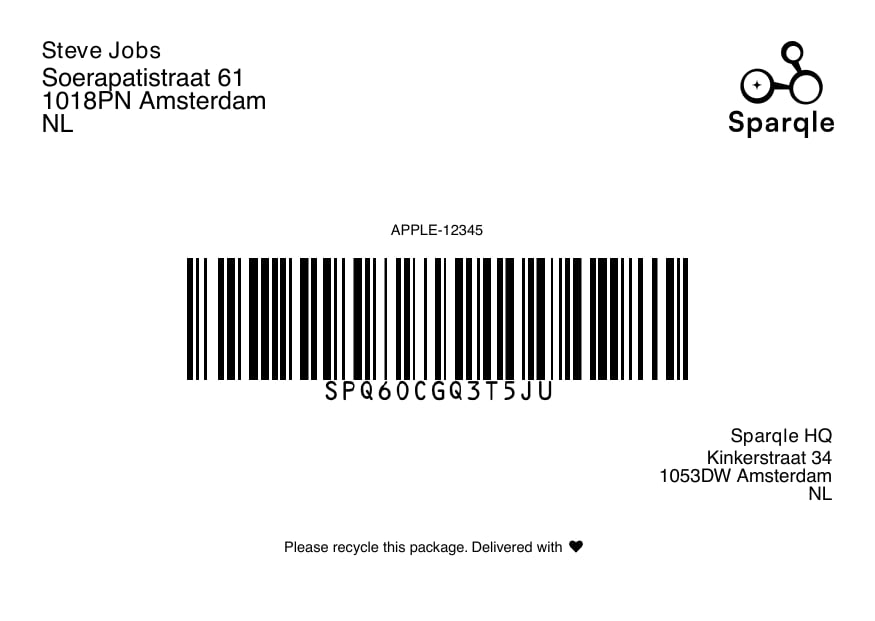
Sparqle generates a shipping label for every order. Labels are returned as a
**base64-encoded PDF** that you decode and print.
## Example
 [Download the sample PDF](/label/preview-label.pdf)
## Single order
```bash theme={null}
curl https://staging-v2.sparqle.tech/orders/label/SPQ-10293 \
-H "api-key: YOUR_API_KEY"
```
Decode the returned base64 string and write it to a `.pdf`:
```js theme={null}
import { writeFileSync } from "node:fs";
const res = await fetch(
"https://staging-v2.sparqle.tech/orders/label/SPQ-10293",
{ headers: { "api-key": process.env.SPARQLE_API_KEY } },
);
const { label } = await res.json();
writeFileSync("label.pdf", Buffer.from(label, "base64"));
```
A label is available once the order has been created. If you request a label
before it has been generated, retry shortly after.
## Bundles (multi-parcel)
When several orders ship together they share an `orderBundleId`. Fetch every
label in the bundle in one call:
```bash theme={null}
curl https://staging-v2.sparqle.tech/orders/label/bundle/BUNDLE123 \
-H "api-key: YOUR_API_KEY"
```
This returns the labels for all orders in the bundle, so you can print them in a
single pass.
## Print size
Labels are landscape A6 by default. You can change the print size in your
Sparqle settings; the label endpoints then return the configured size.
## Tips
* Print at the label's native size — don't scale to fit.
* Store the `barcode` returned on create; it's printed on the label and is what
couriers scan.
[Download the sample PDF](/label/preview-label.pdf)
## Single order
```bash theme={null}
curl https://staging-v2.sparqle.tech/orders/label/SPQ-10293 \
-H "api-key: YOUR_API_KEY"
```
Decode the returned base64 string and write it to a `.pdf`:
```js theme={null}
import { writeFileSync } from "node:fs";
const res = await fetch(
"https://staging-v2.sparqle.tech/orders/label/SPQ-10293",
{ headers: { "api-key": process.env.SPARQLE_API_KEY } },
);
const { label } = await res.json();
writeFileSync("label.pdf", Buffer.from(label, "base64"));
```
A label is available once the order has been created. If you request a label
before it has been generated, retry shortly after.
## Bundles (multi-parcel)
When several orders ship together they share an `orderBundleId`. Fetch every
label in the bundle in one call:
```bash theme={null}
curl https://staging-v2.sparqle.tech/orders/label/bundle/BUNDLE123 \
-H "api-key: YOUR_API_KEY"
```
This returns the labels for all orders in the bundle, so you can print them in a
single pass.
## Print size
Labels are landscape A6 by default. You can change the print size in your
Sparqle settings; the label endpoints then return the configured size.
## Tips
* Print at the label's native size — don't scale to fit.
* Store the `barcode` returned on create; it's printed on the label and is what
couriers scan.