
Example
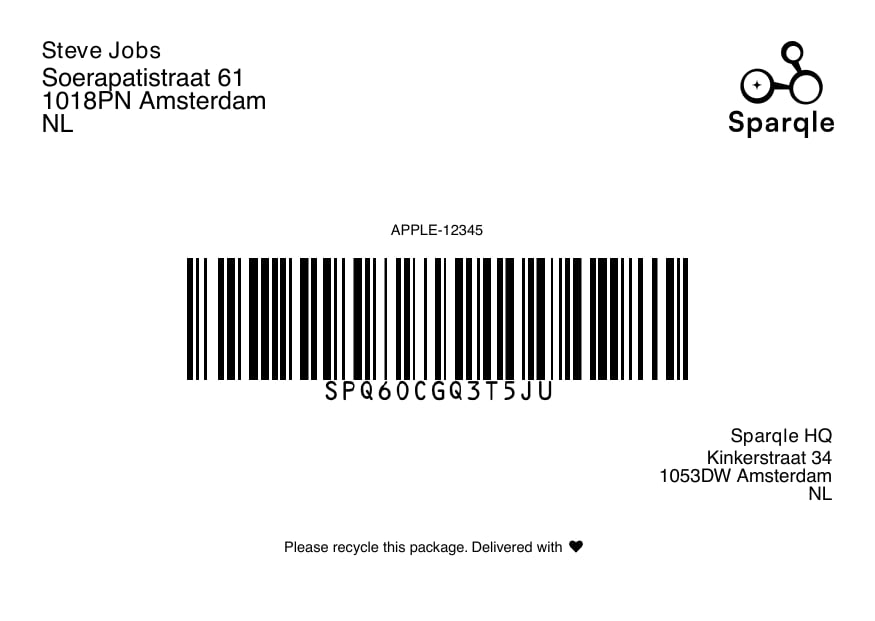
A Sparqle label (landscape A6)
Single order
.pdf:
ZPL
For a Sparqle-generated label, addformat=zpl to receive native ZPL for a
203-DPI printer:
{ "label": "..." }. Decode label as UTF-8 and
write it to a .zpl file. ZPL is always A6 at 203 DPI — printSize is not
supported and returns 400 if passed.
Pass orientation=landscape or orientation=portrait. When you omit
orientation, ZPL uses the same company ORIENTATION setting as PDF labels.
If that setting is portrait (common for PDF), ZPL is portrait too — not landscape
by default. Integrations that always want landscape must pass
orientation=landscape on every request.
Portrait ZPL uses a rotated (^A0R / ^BCR) layout sized ^PW839 / ^LL1184
for vertical thermal printing.
ZPL is only available on the single-order endpoint. Batch and bundle label
calls accept format=pdf (or omit format); format=zpl returns 400.
ZPL is also unavailable when Sparqle passes through a label supplied by an
external carrier. Requests without format=zpl continue to return PDF.
A label is available once the order has been created. If you request a label
before it has been generated, retry shortly after.
Bundles (multi-parcel)
When several orders ship together they share anorderBundleId. Fetch every
label in the bundle in one call:
Print size
PDF labels are landscape A6 by default. For PDF, you can change orientation and print size in your Sparqle settings (or via theorientation / printSize
query params); the label endpoints then return that configured size.
ZPL honors orientation and the same company ORIENTATION setting as PDF,
but always prints A6 at 203 DPI — there is no A4 ZPL variant. Omitting
orientation does not default to landscape: it follows the company setting.
Use orientation=portrait for vertical thermal printers, or
orientation=landscape to pin the previous always-landscape behavior.
Tips
- Print at the label’s native size — don’t scale to fit.
- Store the
barcodereturned on create; it’s printed on the label and is what couriers scan.